Buy Cariera
  • Home
  • Demo
  • Support
  • Themes
  • FB Group
  • Home
  • Demo
  • Support
  • Themes
  • FB Group
home/Knowledge Base/Get Started/Theme Setup & Import
Popular Search:Getting Started, Updates

Theme Setup & Import

1990 views 0 December 12, 2020 Updated on April 22, 2024

After seamlessly uploading and activating the child theme, the next step is activate the bundled plugins and import the demo content. You can follow the instructions in the video below on how to setup the theme.

Video Instruction

Make sure that you have the right server requirements and everything is showing green, just like in the picture below.
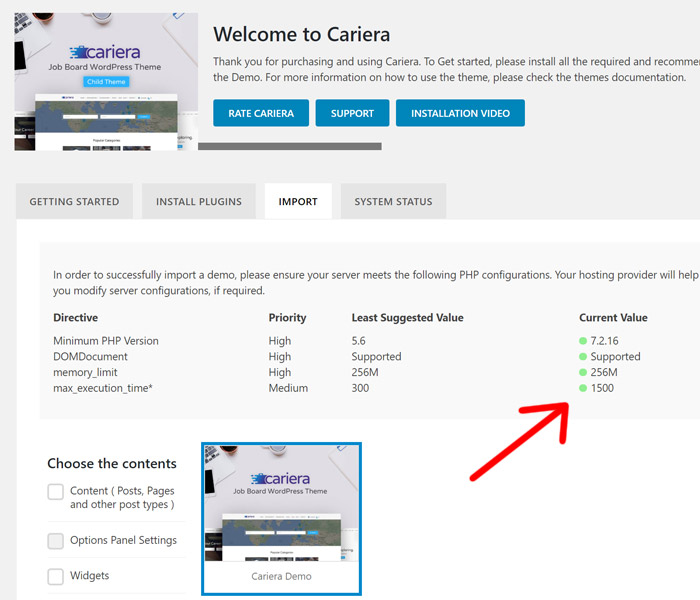
If the server requirements are not met, the importer might not successfully import the demo content.

Related Articles
  • Theme Activation
  • Main Settings & Options
  • Translations
  • Manual/Automatic Updates

Didn't find your answer? Contact Us

Get Started
  • Theme Setup & Import
  • Theme Activation
  • Main Settings & Options
  • Translations
  • Manual/Automatic Updates
  • Theme Installation
Popular Articles
  • Main Settings & Options
  • User Login & Registration
  • Theme Setup & Import
  • Theme Installation
  • Translations
KB Categories
  • Cariera Events
  • Essentials for WPJM
  • Get Started
  • Cariera Core
  • WP Job Manager
  • Maps
  • Guides
  • Troubleshoot
  • Other
Recommended Hosting
Load WordPress Sites in as fast as 37ms!
Hire a Freelancer

  Translations

Theme Installation  

Feel free to open a support ticket with your purchase code if you need any further help.

Support Ticket

About Cariera

Cariera is a complete Job Board theme for WordPress theme and does not require extra plugins.

Support Links
  • Live Demo
  • Theme Page
  • Support Site
  • Facebook Group
Social Links
  • Privacy Policy
  • Terms of Use
  • © 2020 Gnodesign.com. All Rights Reserved.

Popular Search:Getting Started, Updates